
Ansys Icepak: Electronics Cooling Simulation Software
Predict thermal performance from electronic components to complete systems.
Ansys Icepak helps engineers predict temperature, airflow, and heat transfer across chips, packages, printed circuit boards, and electronic assemblies. Connect cooling performance with thermal and structural behavior to evaluate designs before physical testing.

Design electronics with thermal performance in mind
As electronic products become smaller and more powerful, removing heat becomes an increasingly important design challenge. Component placement, board construction, thermal interfaces, and cooling equipment all influence operating temperatures.
Ansys Icepak integrates computational fluid dynamics (CFD) and finite element analysis (FEA) solvers within Ansys Electronics Desktop. Engineers can investigate airflow, heat transfer, and structural response through connected electrothermal and thermal-mechanical workflows.
Evaluate heat transfer from individual components through the surrounding assembly. Compare cooling approaches, investigate hot spots, and understand how temperature changes affect the wider design.
With Icepak, your team can:
- Identify components approaching their temperature limits.
- Understand heat paths through boards, packages, and enclosures.
- Compare air and liquid cooling designs.
- Investigate temperature changes under varying power loads.
- Connect electrical losses with temperature rise.
- Assess thermal stress and deformation through connected structural analysis.
- Carry early design concepts into detailed electronics cooling simulation.

Ansys Icepak Highlights
Perform conduction, convection and radiation conjugate heat transfer analyses, with many advanced capabilities to model laminar and turbulent flows, and species analysis including radiation and convection.
What’s new in Ansys Icepak
Ansys Icepak 2026 R1
Model setup and results handling
Updates improve solution loading, field plots, results summaries, and geometry handling. Part activation and deactivation, snapping improvements, and additional heat-flux visualization give engineers more control during model preparation and review.
Meshing and physics
Enhancements cover thermal mesh fusion, primitive-object meshing, thermal networks, heat-exchanger boundaries, and dynamic thermal modeling.
A native Joule heating solver for CPU and GPU operation is available as a beta feature in 2026 R1.
System thermal workflows
Updated system thermal model workflows improve model generation and reporting. Discovery-to-Icepak transfer of boundaries and excitations is available as a beta feature in 2026 R1, helping carry model setup into detailed electronics thermal analysis.
Applications

Thermal simulation PCBs, ICs and IC packages
Predict temperatures across integrated circuits, packages, and printed circuit boards. Investigate how component placement, board construction, and thermal interfaces affect heat dissipation within the surrounding assembly.

Electronic products and assemblies
Evaluate cooling in electronic devices and complete product assemblies. Compare heat sinks, fans, airflow paths, and enclosure designs to understand their effects on component temperatures and overall thermal performance.
Connect thermal and structural analysis to investigate how temperature changes affect the assembly.

Power electronics
Assess cooling for inverters, converters, power supplies, and related equipment. Connect electrical losses with thermal behavior and evaluate the heat sinks, interfaces, and cold plates used to remove heat from high-power components.

Cabinets and outdoor enclosures
Investigate heat buildup in industrial control cabinets, telecommunications equipment, and enclosed electronics. Evaluate fan and vent arrangements, natural convection, ambient temperature changes, and solar loading in outdoor installations.

Servers, racks, and data centers
Analyze cooling for servers and electronic equipment within racks and data-center environments, including high-density systems supporting AI workloads.
Investigate airflow distribution, recirculation, hot spots, and cooling-failure scenarios to understand how equipment layout and cooling arrangements affect temperatures.
Developing electronics at a startup?
Eligible startups can access Ansys simulation software at startup pricing. KETIV can help you explore the available packages and understand which options fit your engineering needs.
Capabilities
Evaluate heat transfer throughout the design
Icepak models conduction through solid components, convection in surrounding air or liquid, and radiative heat exchange.
Conjugate heat transfer connects the solid and fluid regions, helping engineers understand how the cooling environment influences component temperatures. Run steady-state studies for sustained operating conditions or transient studies for startup, changing loads, and other time-dependent events.

Build thermal models from electronics design data
Bring mechanical and electrical CAD information into the thermal workflow. Represent packages, boards, enclosures, and cooling equipment at the level of detail needed to answer the design question.
CAD healing, geometry simplification, and metal-fraction methods support model preparation and the representation of electronics geometry. Thermal libraries provide recurring elements such as fans, heat sinks, and thermal networks.

Control mesh detail around critical features
Use body-fitted meshing and thermal mesh fusion to represent complex electronic assemblies. Local mesh controls allow engineers to concentrate detail around important heat paths and flow passages while managing the overall model size.
Connect electrical losses to temperature rise
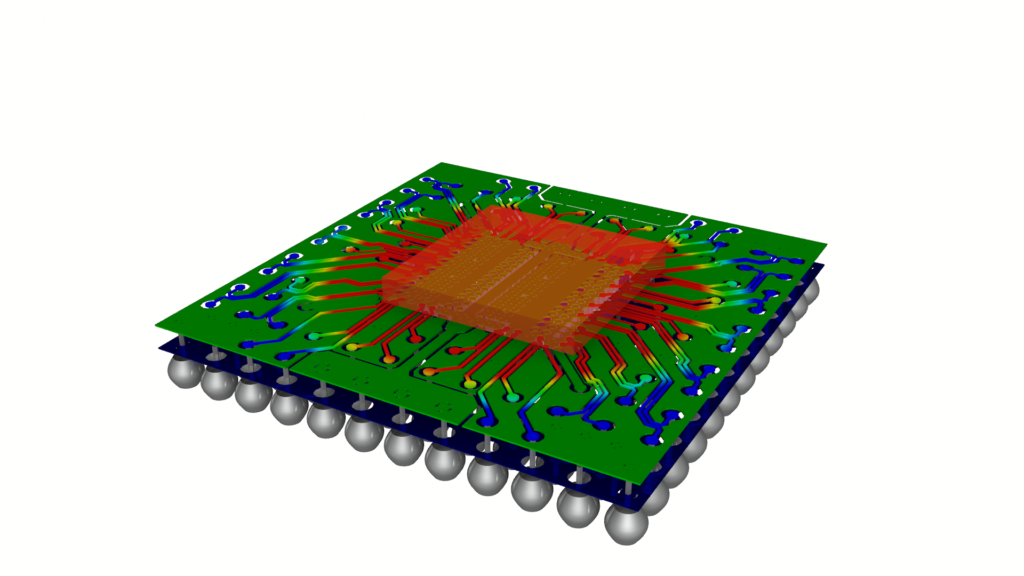
Use loss data from Ansys electromagnetic tools, including HFSS, SIwave, and Maxwell, as inputs to thermal analysis.
SIwave and Icepak can exchange DC power and temperature data to investigate Joule heating in PCBs and packages. HFSS and Icepak support studies of how electromagnetic losses and temperature changes affect RF components.
Investigate thermal and structural behavior
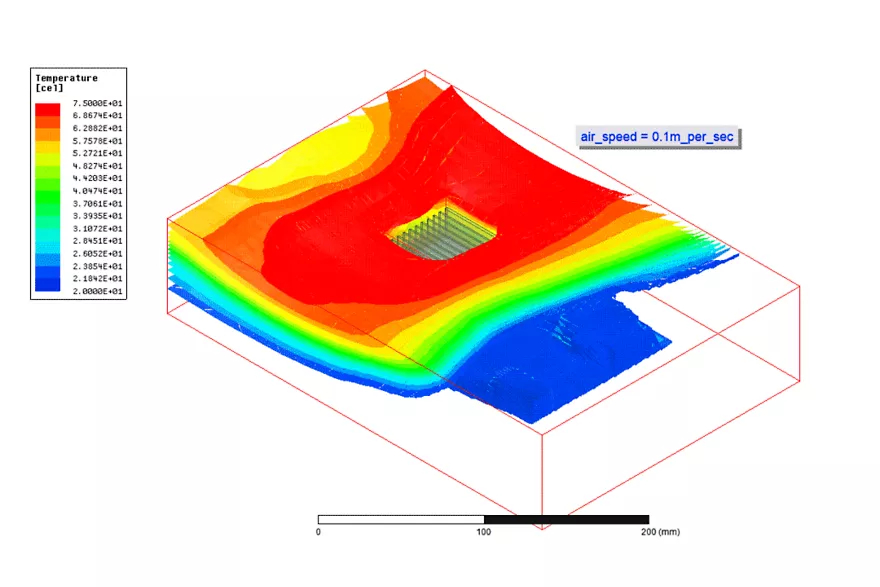
Connect thermal results with structural analysis to evaluate temperature-driven deformation and stress.
Extend the workflow with Ansys Mechanical and Sherlock to investigate how operating temperatures and temperature changes affect components, interconnections, and electronics reliability.
Move from design exploration to detailed analysis
Use Ansys Discovery to investigate cooling concepts during early design work, then carry designs into Icepak for detailed thermal and airflow analysis.
This connected workflow helps teams develop promising concepts before investing in more detailed models. The 2026 R1 beta transfer capability extends that connection to boundaries and excitations.

Compare cooling strategies
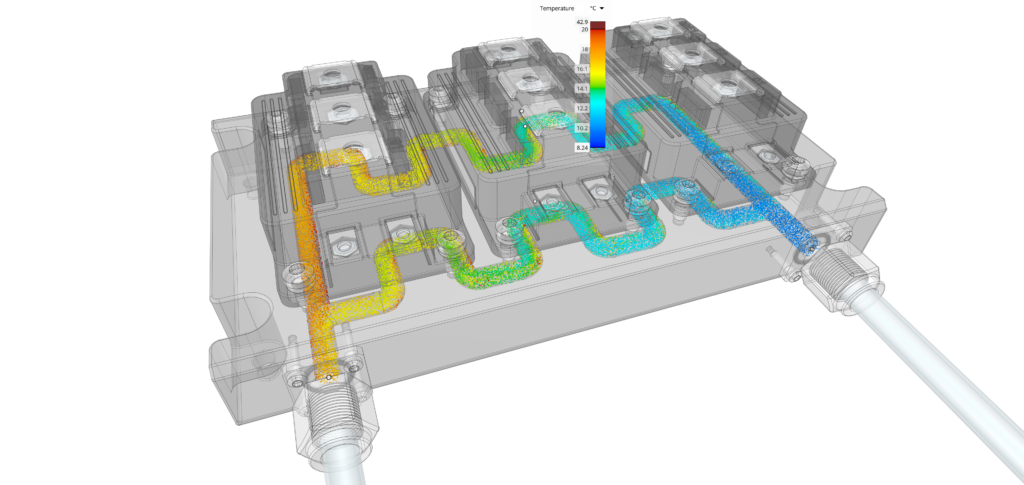
Evaluate natural convection, forced-air cooling, cold plates, and single-phase immersion cooling.
Investigate the effects of airflow, coolant conditions, materials, and thermal interfaces to compare cooling approaches within the complete assembly.
Support system simulation with reduced-order models
Use detailed Icepak simulation data to develop reduced-order thermal models for Ansys Twin Builder workflows. These models support system studies and control development without repeating a full CFD calculation for every scenario.

Discuss your electronics cooling project with KETIV
Frequently asked questions about Ansys Icepak
Q: What is Ansys Icepak used for?
Ansys Icepak predicts temperature, airflow, and heat transfer in electronics. Applications include IC packages, PCBs, electronic assemblies, power electronics, equipment enclosures, servers, and data-center cooling studies.
Connected thermal and structural workflows help engineers investigate how temperature affects the wider design.
Q: How is Icepak different from Ansys Fluent?
Icepak provides a workflow focused on electronics thermal management within Ansys Electronics Desktop. It combines Fluent-based CFD with connected electrothermal and structural capabilities.
Fluent provides a broader environment for fluid-flow applications and additional physics. The appropriate choice depends on the required analysis, available design data, and modeling workflow.
Q: Can Icepak model cabinets and data centers?
Yes. Icepak supports thermal studies involving electronic equipment in enclosures, cabinets, server racks, and room-level environments.
The modeling approach depends on the study’s scope, available equipment data, and required level of detail.
Q: Can Icepak model liquid cooling?
Yes. Applications include cold plates, direct-to-chip cooling, and single-phase immersion cooling. Engineers can investigate how coolant conditions, flow paths, and thermal interfaces affect component temperatures.
Q: Does Icepak support GPU acceleration?
Yes, for supported simulations. Compatibility depends on the software release, selected physics, and hardware configuration. Performance gains vary by model and computing setup.
The native CPU/GPU Joule heating solver is identified as a beta feature in the 2026 R1 release.
Q: Does Icepak support electrothermal analysis?
Yes. Icepak works with Ansys electromagnetic simulation tools to connect electrical losses with temperature rise. These workflows help engineers investigate the relationship between electrical performance, heat generation, and cooling.
Q: How do Ansys Discovery and Icepak work together?
Discovery supports early design exploration, while Icepak provides detailed electronics thermal and airflow analysis. Engineers can carry designs between these stages as the model develops.
In 2026 R1, transfer of Discovery boundaries and excitations into Icepak is available as a beta feature.