With Inventor, AutoCAD, Autodesk Vault, and other newly released 2018 Autodesk software, we want to share the best ways to download these releases for yourself and start exploring what’s new in 2018.
We’ll cover how to download the latest release from your Autodesk Account Portal, as well as a new simplified way of using the Autodesk’s Desktop Application.
Autodesk Account Portal
It should be noted these new versions are currently only available for active maintenance plan holders and subscription holders. If you fall under either category, you’re able to log in at manage.autodesk.com and access the page below:
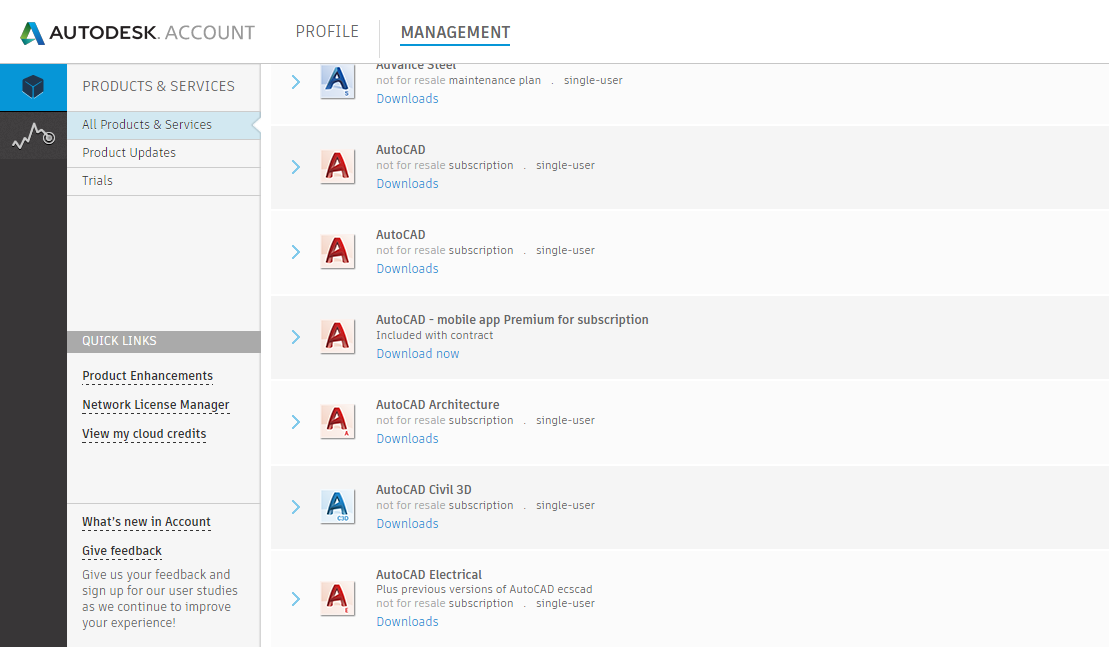
Navigate to the product you wish to download and click the ‘Download’ button.
You will then see a window that looks like this:
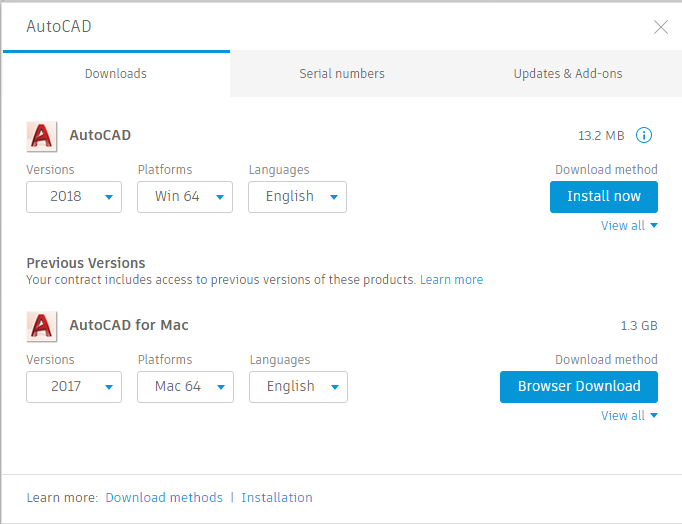
From here, under ‘Versions,’ you’ll see the 2018 option is available. Be sure to check your Operating System and language, then click ‘Install Now.’
If you prefer a different method of download, you can also select ‘view all’ for more options (we recommend using the ‘Browser Download’ Option).
If you went ahead with the ‘Install Now’ option, go ahead and open the .exe file and it will begin installing. For the ‘Browser Download’ option, wait for the download to complete and unzip the downloaded files. If there is more than one part for the product download, you will have to wait for all the parts to complete before unpacking the files and beginning installation.
Autodesk Application
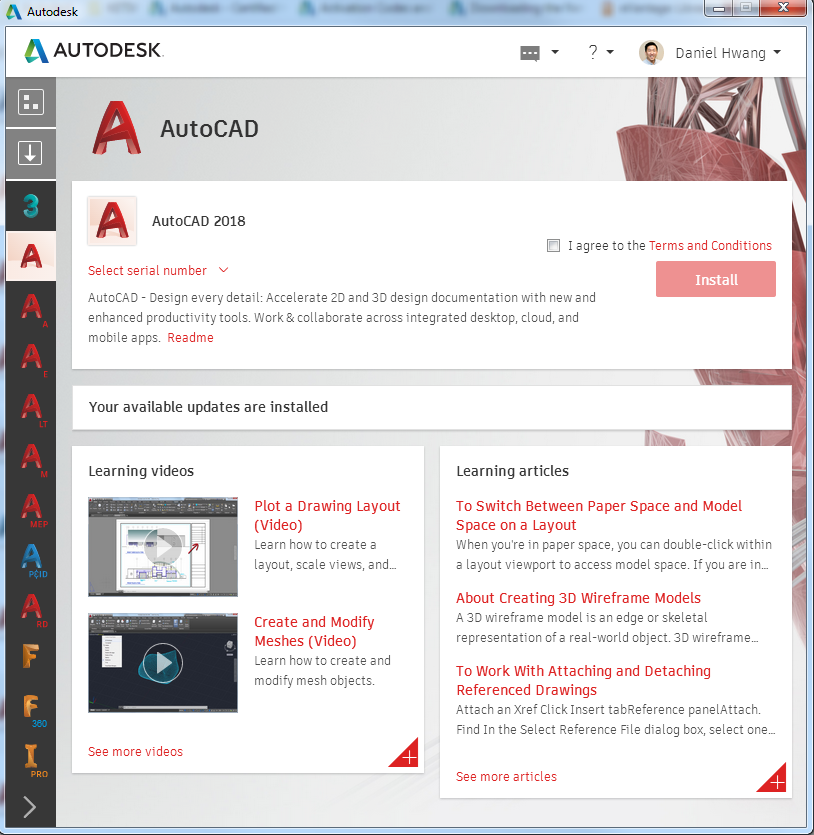
With 2018, there’s another option to download and install the latest versions. If you go to the Autodesk Desktop App (it should already be on your computer if you have previous versions installed), you can find a window like this.
Go ahead and log in with your Autodesk credentials.
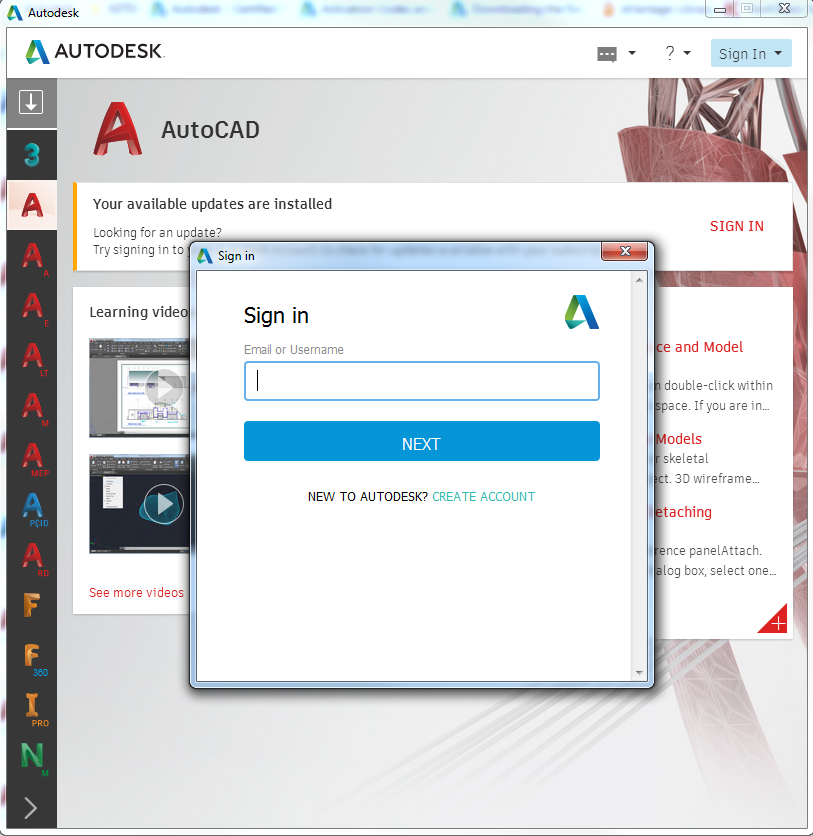
After logging in, you will see the same products as you would at manage.autodesk.com located on the left panel. If you navigate to any new product, you will see that a new option has appeared in the Desktop App. You can agree to the “Terms and Conditions” and Install.
This will begin the download and installation from this window. You can also view the serial numbers from this updated app.
For more information on how to access the latest software and tips and tricks on using the software, join the Autodesk Virtual Academy community.
2018 will not download on my computer
Hello Dennis,
There are a couple of reasons you may not be able to see the Inventor 2018 download.
1. If you have not been given permission as a named user by your Contract Manager or Software Coordinator to view Inventor downloads.
2. If you own an Autodesk Design Collection of some sort that has Inventor included, you will not be able to download Inventor 2018 until the 2018 version of the Design Collection becomes available.
3. If you are trying to access the download through the Autodesk Desktop App and the above two conditions do not apply to you, then you may have User Access Control settings set too high or an anti-virus software may be blocking the download.
If this is the case, you may want to consider the following:
Turning off User Access Control settings:
1. Go to your start menu and type “User Access Control”
2. Open up “User Access Control” settings and set the setting to “Never Notify” and click okay
Turn off Anti-Virus:
Check if you have any anti-virus installed and turn them off while you download/install
Lastly, you may want to try turning off your firewall for the download/installation
If these do not apply to you, please let us know and We’ll try and sort out what might be going wrong for you.
How to make download software AutoCad trial?
Hello Solange,
You should able to start an AutoCAD trial by going to the following webpage:
http://www.autodesk.com/products/autocad/free-trial
Keep in mind that if you do not have an Autodesk ID, you will need to create one.
Also, if you do have an Autodesk ID and have already signed up for the trial using that account, you will not be able to sign up again.
hello. Daniel.
I’m Dong Su Kim, hankook delcam in korea.
I have a question.
How to download PowerMILL2018 Standard, Premium, Ultimate version?
I want to know download link or the file.
Best regards.
Dong Su.
Hello Dong Su,
Thanks for commenting.
If you have purchased PowerMILL, you should be able to see the product download available under your Autodesk account (at manage.autodesk.com). If you do not see it there, you may not be the contract manager on the account. If you are the contract manager, and still do not see it, there may be an issue with your account. Please email us if that is the case.
If you have to purchase the product and are looking for a trial, there is not a trial version available for this product. Likewise, there is no public download link for this product and can only be found in your account.
When are the 2018 collections going to available for the educational community
Hello Tom!
Unfortunately there are no plans to make the 2018 collections available for the educational community. The reason for this is because, unlike the Design Suites from previous years, the collections require individual downloads. There is no collection “package” to download that installs all the products at one time. In essence, the education community already has access to the collections because they have access to the individual products in those collections.
Hope this answers your question
-Daniel
Thank you for your input.
Hi,
Im the window opened, in the combo is just showed the 2017 version… what´d be the issue?